



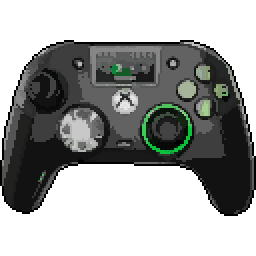
Nacon Revolution X Unlimited


Nacon Revolution X Unlimited Input lag comparison
| # | Connection | Mode | LatencyAverage (ms) | Polling RateMedian (Hz) | Jitter | OSBuild ver. | FWTester ver. | |
|---|---|---|---|---|---|---|---|---|
| Latency P82 | ||||||||
1 | Cable PRIMARY | XInput | 4.00 8.01 | 250.25 | 1.10 1.10 | Win 11 10.0.26200 | --- 5.2.4.0 | |
Stick LatencyP82 ✓ Selected 5.99 ms 8.01 ms 10.04 ms 1.1 ms 250.25 Hz (see 📊) Polling Rate 2.57 ms 4 ms 5.85 ms 0.46 ms 250.25 Hz 248.3 Hz Note: This test are based on polling rate and do not represent actual input-lag. | ||||||||
2 | Dongle PRIMARY | XInput | 5.57 10.9 | 250 | 1.10 1.15 | Win 11 10.0.26200 | --- 5.2.4.0 | |
Stick LatencyP82 ✓ Selected 8.93 ms 10.89 ms 12.98 ms 1.15 ms 250 Hz (see 📊) Polling Rate 2.69 ms 4 ms 6.31 ms 0.38 ms 250 Hz 248.29 Hz Note: This test are based on polling rate and do not represent actual input-lag. | ||||||||
3 | Bluetooth PRIMARY | DInput | 14.7 18.4 | 199.96 | 2.19 2.54 | Win 11 10.0.26200 | --- 5.2.4.0 | |
Stick LatencyP82 ✓ Selected 13.35 ms 18.37 ms 25.23 ms 2.54 ms 199.96 Hz (see 📊) Polling Rate 4.78 ms 5 ms 19.95 ms 1.18 ms 199.96 Hz 192.03 Hz Note: This test are based on polling rate and do not represent actual input-lag. |
Latency
Our visualization focuses on Average Latency, presented as vertical bars to make comparing performance across different connection modes (Wired, Bluetooth, Dongle) instant and intuitive.
The chart differentiates between:
- Button Latency: How quickly the game registers a physical button press.
- Stick Latency: The delay in registering joystick movement (tested at 99% deflection).
Visualizing Stability (Jitter)
You may notice that the top portion of some bars is semi-transparent or "faded". This represents Jitter (instability):
- Solid Bar: Represents the stable, consistent average latency.
- Faded Top: Indicates the variance. A larger transparent area means higher jitter, implying the controller's response time fluctuates. A solid bar with little to no fading indicates a highly stable connection.
Deep Dive: Click the arrow to reveal Probability Distribution Charts. These show the exact breakdown of every input tested, displaying Probability (%) on the Y-axis and Latency (ms) on the X-axis.
Polling Rate vs. Latency
It is crucial to understand that Polling Rate and Latency are measured using two entirely different methodologies on our site:
- Latency (ms) is measured by the Prometheus 82 hardware. It captures the physical movement of the stick or button via hardware interrupts with microsecond precision. This is the "real-world" delay.
- Polling Rate (Hz) is measured via a Software Tool. It shows how often the OS receives reports from the USB stack.
Common Myth: A higher polling rate (like 8000 Hz) does not automatically guarantee lower latency if the controller's internal processing is slow. Conversely, a high polling rate on a chart might show fluctuations (e.g., 7800Hz instead of 8000Hz) due to OS jitter or CPU scheduling, which does not necessarily impact the hardware latency measured by the P82.
To test your own gamepad's polling rate, you can use our tool: Download Polling Rate Tester.
Testing Methods
Gamepadla ensures data integrity by combining three distinct testing methodologies:
-
Prometheus 82 (P82): Our gold standard. A custom-built hardware device that physically actuates buttons and sticks. It uses high-speed hardware interrupts to capture events, making it independent of the controller's polling rate. It provides an error margin of only ±1ms for buttons and sticks. View on GitHub.
-
GPDL Tester: An electrical monitoring tool for highly accurate button latency. While P82 simulates human-like mechanical movement, GPDL focuses on the electrical signal speed. View on GitHub.
-
Software Polling Test: A pure software diagnostic to check communication frequency. We use this to verify if a controller actually reaches its advertised specs (e.g., 1000Hz or 8000Hz) at the OS level. Download Software.
Note: By comparing hardware-level latency (P82) with software-level reports (Polling Test), we can identify if a controller has "fake" high polling rates or poorly optimized firmware.
Stick test of Nacon Revolution X Unlimited
Stick test results for Nacon Revolution X Unlimited gamepad, by John Punch
Comment: For the stick asymmetry test, complete partial movement restriction rings (large) were used.
Errors Panel
Inner Deadzone
The Inner Deadzone is the area around the center of the stick where small movements are not registered. This helps prevent stick drift or accidental inputs, but if the deadzone is too large, it can make aiming less precise, especially in games requiring fine control. We evaluate the Inner Deadzone based on how much you need to move the stick before it responds - the less movement required, the better.
The Nacon Revolution X Unlimited has no Inner Deadzone. The stick responds immediately to even the slightest movement, which is excellent for aiming accuracy and micro-control. This makes it a great choice for precision-heavy games like first-person shooters (e.g., Valorant or Apex Legends).
For comparison, many budget gamepads often have a moderate to large Inner Deadzone, while premium controllers typically aim for a slight or no deadzone for better precision.
Want to learn more? Check out our video explanation of how the Inner Deadzone works.
Outer Deadzone
The Outer Deadzone is the area near the edge of the stick's physical range where you are still deflecting it, but the system already registers the maximum 100% input. As a result, maximum speed (e.g., camera turn) is reached before the stick hits the physical gate. This narrows the effective range for precise aiming and can make edge control feel too sharp or twitchy. The smaller this zone, the better, as it allows you to use the entire physical range of the stick for precise control.
The Nacon Revolution X Unlimited has a slight Outer Deadzone (0.8 mm). Although 100% input is reached slightly before the physical edge, this difference is minimal and unlikely to be noticeable during actual gameplay.
For comparison, budget gamepads often have moderate to large Outer Deadzones, while premium controllers strive for minimal or no deadzone to maximize control.
Want to learn more? Check out our video explanation of how the Outer Deadzone works.
Stick Asymmetry
Stick Asymmetry measures the consistency of the joystick's response across different directions at partial deflection (~80%) using physical limiters (brackets). This reveals asymmetries that might be hidden by clamping at 100% deflection. A high asymmetry score indicates a problem where for the same physical movement, the reported coordinates are inconsistent. The lower the percentage, the more predictable the stick movements. Lower is better.
For the Nacon Revolution X Unlimited, the Stick Asymmetry is 15.2% for the left stick and 8.2% for the right stick. Higher values can lead to noticeable inconsistencies, potentially impacting aiming or movement in games.
Testing Methodology: It's crucial to note that this test is performed at partial stick deflection (~80%), using special physical limiters (brackets/clips). Testing at 100% deflection often hides asymmetries because the controller's output is clamped at the maximum value, artificially 'smoothing' the resulting shape. Our method reveals the true performance of the stick in the ranges most critical for gameplay. This precise approach was also utilized by Linus Tech Tips in their controller review.
For comparison, many budget gamepads show asymmetry levels above 30%, while high-end controllers typically stay below 10% for better uniformity.
Learn more about how different gamepads perform in the Stick Asymmetry test and how to conduct such a test in this article. You can learn how to test joystick asymmetry yourself from this video.
Circle Error
Circle Error evaluates how closely the stick’s movement follows a perfect circle. A high Circle Error means the path is more square-like, which can cause inconsistent speeds when moving diagonally - your character might move faster or slower than expected. The lower the percentage, the better, as it ensures smooth, uniform movement in all directions.
For the Nacon Revolution X Unlimited, the Circle Error is 0.0% for the left stick and 0.0% for the right stick. This is an excellent result, providing smooth, natural diagonal movement similar to premium controllers.
For comparison, budget gamepads often have Circle Errors above 12%, resulting in 'square' feeling sticks, while high-quality ones aim for under 8% for better smoothness.
Want to learn more? Check out our video explanation of how Circle Error impacts performance.
Resolution (Stick Bitness)
Stick Bitness measures the precision of the joystick’s analog input, similar to bit depth in audio. Higher bitness means more distinct positions the stick can register, leading to smoother and more accurate control. Lower bitness can result in 'stepping' or less fluid movement, especially noticeable in slow, precise actions like aiming.
Unlike declared digital resolution, our True Bitness metric is derived from actual physical stick movement, reflecting the usable positions the stick can produce in practice.
The Nacon Revolution X Unlimited has 11.7 bits on both sticks.
Note: Recorded with an older version before True Bitness.
This corresponds to a measured Step Resolution of 0.00060 on the left stick and 0.00060 on the right. In practical terms, this means the gamepad can register about 1,667 individual steps from the center to the edge (SFC) on the left stick, and 1,667 SFC on the right.
For comparison, many budget gamepads have around 8 bits, while premium ones often exceed 10 bits for superior accuracy.
Want to learn more? Check out our video explanation of how Stick Bitness affects control. It is important to note that the video specifies the resolution of the stick, not the bit depth; the higher the bit depth, the higher the resolution.
Center Error (Stick Centering)
Center Error (also referred to as Stick Centering) measures how accurately the joystick returns to its neutral (center) position after you release it. A low Center Error prevents stick drift - a common issue where your character or camera moves slightly in a game, even when you're not touching the stick. The lower the percentage, the better the centering, and the less likely you are to experience drift.
For the Nacon Revolution X Unlimited, the Center Error is 1.8% for the left joystick and 2.6% for the right stick. This is an excellent result. The sticks return almost perfectly to the center natively, without relying on an inner deadzone. This minimizes the risk of stick drift and is ideal for competitive gaming.
This test methodology intentionally employs a more rigorous approach by implementing small-angle deflection and release, which produces the most challenging conditions for stick re-centering. This technique differs from the conventional maximum-deflection method where the stick is pulled to its full range and released, as small-angle deflection better simulates the micro-adjustments typically executed during actual gameplay scenarios, providing more representative data on potential stick drift occurrence during normal use.
Want to learn more? Check out our video explanation of how Center Error works.
Cardinal Snapping
Cardinal Snapping (sometimes referred to as Axis Magnet) is a form of stick processing where the controller's output artificially 'snaps' or clings to the cardinal (horizontal and vertical) axes when the stick passes close to them. While this can make pure horizontal or vertical movements feel perfectly straight, it distorts the natural movement path and makes diagonal aiming or fine steering less predictable.
The Nacon Revolution X Unlimited shows no Cardinal Snapping. This means the stick does not artificially cling to the horizontal or vertical axes, preserving your real movement path for consistent aiming and natural analog control.
Want to learn more? Check out our video explanation of how Cardinal Snapping affects stick behavior.
Disclaimer
We tested the Nacon Revolution X Unlimited gamepad using a single unit, so keep in mind that other units of this model might perform slightly better or worse. In most cases, these differences are minor and shouldn’t affect your experience significantly. The results were obtained with the Stick Tracer program, and some values might vary if you use different software or testing methods.
Testing conditions, such as the gamepad’s firmware version (FW: ) or connection type, can also influence the results. If you have this gamepad, we’d love for you to share your own test results! This will help us build a more comprehensive picture of the Nacon Revolution X Unlimited’s performance across different units.
Full test results can be viewed on the test page.
Stick Movement Linearity Test
Linearity test for Nacon Revolution X Unlimited • Firmware Not Supported • Stick Analyzer 2.3.0.2 • Dongle connection • Xinput mode • Manual Input. Uploaded, by Fitall
Comment: 500
Stick Motion Resolution Analysis
This test evaluates the analog stick's ability to register unique positions during a controlled, linear motion from the center to the edge of its range. The analysis was conducted using the Line program, ensuring precise measurement of the stick's resolution, linearity, and response characteristics.
Data Points
Data Points represents the total number of coordinates captured during the stick's movement from the center to the edge. This includes both the stable analog positions and any points affected by signal jitter, noise, or active processing. In this test, we recorded 458 data points, which is an excellent result that indicates very precise stick movement registration.
Note on variability: This count is not a fixed hardware limitation. It represents the data collected during this specific 1.32-second test. The total number of points depends heavily on:
- Polling Rate: Controllers with higher polling rates (e.g., 1000 Hz) transmit updates more frequently, yielding more data points in the same time frame.
- Movement Speed: Moving the stick slower increases the test duration, allowing the software to collect many more samples. For example, during specialized high-precision bit-depth tests where the stick is moved extremely slowly, the same controller might record several times more points.
To evaluate the actual physical resolution of the stick, it is essential to also look at the Straight Points metric below, which filters out signal noise and duplicates.
Straight Points
Straight Points represent the number of clean, unique positions detected after filtering out duplicates, tremor, and signal processing artifacts during stick movement. This filtering process identifies points that follow a consistently increasing trajectory, representing the true analog steps of the stick. The test registered 246 straight points. This is an excellent result, indicating very smooth and precise stick movement.
Similar to Data Points, the count of Straight Points is variable and scales with the test duration and controller polling rate. Rather than representing a fixed hardware limit, it shows how many stable, distinct coordinates the controller successfully reported during this specific movement sequence. A higher number under similar conditions indicates a smoother, more detailed transition from center to edge.
Resolution
Resolution in this test refers to two complementary measurements:
Total Resolution: 272 positions across the entire stick range. This number represents how many distinct positions the analog stick can detect from center to edge. This might result in somewhat stepped or less smooth movement
Step Resolution: 0.00367 per increment. This value represents the average size of each step between detected positions (smaller values indicate higher precision). It determines how smoothly the stick can transition between positions, which directly impacts precise aiming and subtle movements in games.
A high total resolution combined with a low step resolution provides the optimal experience for precise control in games requiring fine adjustments.
Tremor
Tremor percentage represents the amount of signal variation and micro-jitter that occurs between the physical movement of the stick and the final output. It is calculated as the percentage of data points that do not follow a strictly increasing trajectory. The test measured 46.3% tremor. This higher percentage indicates more active signal processing, which is a characteristic of how this stick handles movement data.
While lower tremor indicates a cleaner raw signal, its presence does not significantly impact real-world gameplay. Different controllers have different signal processing characteristics. Notably, an artificially low tremor (0%) often indicates aggressive digital filtering or smoothing implemented by the manufacturer. While this makes the signal look clean, it can introduce response delay (input lag). Therefore, a moderate level of tremor is typical and often preferred over heavy filtering that degrades responsiveness.
Linearity
Linearity represents how closely the stick movement follows an ideal linear path. It's calculated as 100% minus the nonlinearity percentage, where nonlinearity measures deviations from a perfectly straight line. The test measured 93.5% linearity. This indicates excellent stick linearity, providing consistent and predictable movement.
At the same time, a gamepad stick is not a perfectly linear mechanical system. The stick rotates around a pivot, the cap travels along an arc, and the sensor reads that rotational movement rather than a truly straight physical path. Because of this, a graph that bends slightly below the ideal straight line is often normal. In many cases, that lower arc-like bow reflects the real mechanics of the stick more faithfully than a response that was tuned mainly to look perfectly straight in this specific test.
What matters most is that the movement remains smooth, progressive, and predictable. A mild, even downward curve can be acceptable or even technically more natural, while sharp dips, waviness, uneven acceleration, or asymmetry still indicate worse response quality.
Test Duration
The time taken to complete the test was 1.32 seconds. Note that this test was completed too quickly for optimal results. A slower, more controlled movement would provide more accurate measurements. For the most accurate results, the stick movement should be smooth and controlled, typically taking between 5 and 8 seconds.
Linearity test for Nacon Revolution X Unlimited • Firmware Not Supported • Stick Analyzer 2.3.0.2 • Cable connection • Other mode • Manual Input. Uploaded, by Fitall
Comment: 1000
Stick Motion Resolution Analysis
This test evaluates the analog stick's ability to register unique positions during a controlled, linear motion from the center to the edge of its range. The analysis was conducted using the Line program, ensuring precise measurement of the stick's resolution, linearity, and response characteristics.
Data Points
Data Points represents the total number of coordinates captured during the stick's movement from the center to the edge. This includes both the stable analog positions and any points affected by signal jitter, noise, or active processing. In this test, we recorded 632 data points, which is an excellent result that indicates very precise stick movement registration.
Note on variability: This count is not a fixed hardware limitation. It represents the data collected during this specific 1.62-second test. The total number of points depends heavily on:
- Polling Rate: Controllers with higher polling rates (e.g., 1000 Hz) transmit updates more frequently, yielding more data points in the same time frame.
- Movement Speed: Moving the stick slower increases the test duration, allowing the software to collect many more samples. For example, during specialized high-precision bit-depth tests where the stick is moved extremely slowly, the same controller might record several times more points.
To evaluate the actual physical resolution of the stick, it is essential to also look at the Straight Points metric below, which filters out signal noise and duplicates.
Straight Points
Straight Points represent the number of clean, unique positions detected after filtering out duplicates, tremor, and signal processing artifacts during stick movement. This filtering process identifies points that follow a consistently increasing trajectory, representing the true analog steps of the stick. The test registered 373 straight points. This is an excellent result, indicating very smooth and precise stick movement.
Similar to Data Points, the count of Straight Points is variable and scales with the test duration and controller polling rate. Rather than representing a fixed hardware limit, it shows how many stable, distinct coordinates the controller successfully reported during this specific movement sequence. A higher number under similar conditions indicates a smoother, more detailed transition from center to edge.
Resolution
Resolution in this test refers to two complementary measurements:
Total Resolution: 414 positions across the entire stick range. This number represents how many distinct positions the analog stick can detect from center to edge. This might result in somewhat stepped or less smooth movement
Step Resolution: 0.00241 per increment. This value represents the average size of each step between detected positions (smaller values indicate higher precision). It determines how smoothly the stick can transition between positions, which directly impacts precise aiming and subtle movements in games.
A high total resolution combined with a low step resolution provides the optimal experience for precise control in games requiring fine adjustments.
Tremor
Tremor percentage represents the amount of signal variation and micro-jitter that occurs between the physical movement of the stick and the final output. It is calculated as the percentage of data points that do not follow a strictly increasing trajectory. The test measured 41.0% tremor. This higher percentage indicates more active signal processing, which is a characteristic of how this stick handles movement data.
While lower tremor indicates a cleaner raw signal, its presence does not significantly impact real-world gameplay. Different controllers have different signal processing characteristics. Notably, an artificially low tremor (0%) often indicates aggressive digital filtering or smoothing implemented by the manufacturer. While this makes the signal look clean, it can introduce response delay (input lag). Therefore, a moderate level of tremor is typical and often preferred over heavy filtering that degrades responsiveness.
Linearity
Linearity represents how closely the stick movement follows an ideal linear path. It's calculated as 100% minus the nonlinearity percentage, where nonlinearity measures deviations from a perfectly straight line. The test measured 94.3% linearity. This indicates excellent stick linearity, providing consistent and predictable movement.
At the same time, a gamepad stick is not a perfectly linear mechanical system. The stick rotates around a pivot, the cap travels along an arc, and the sensor reads that rotational movement rather than a truly straight physical path. Because of this, a graph that bends slightly below the ideal straight line is often normal. In many cases, that lower arc-like bow reflects the real mechanics of the stick more faithfully than a response that was tuned mainly to look perfectly straight in this specific test.
What matters most is that the movement remains smooth, progressive, and predictable. A mild, even downward curve can be acceptable or even technically more natural, while sharp dips, waviness, uneven acceleration, or asymmetry still indicate worse response quality.
Test Duration
The time taken to complete the test was 1.62 seconds. Note that this test was completed too quickly for optimal results. A slower, more controlled movement would provide more accurate measurements. For the most accurate results, the stick movement should be smooth and controlled, typically taking between 5 and 8 seconds.
Nacon Revolution X Unlimited specifications
Internal
External
Features
Connection
Software
Platforms


User comments
I find the Xbox Elite 2 overrated, as I had two that failed within six months. In contrast, my Nacon Revolution X Unlimited has been performing flawlessly. I'll return in six months to share my ongoing experience.
How does the Revolution X Unlimited compare to the older X Pro in terms of fit and feel? I found the X Pro to be very comfortable, so I'm curious if this new model offers any improvements or changes.
I'm extremely dissatisfied with the quality of the case materials, it looks and feels very cheap, especially compared to the Dualsense Edge case. It feels like the developers didn't put much effort into supporting this controller, so I ended up selling it.
I should mention that pressing the lower paddles and the RT trigger simultaneously is impossible. To address the height issue of the lower paddles, I had to attach some 3M rubber bands, which is disappointing for a controller with such potential.
The Revolution X Unlimited looks solid, but I’m not convinced it’ll outperform the competition. I've seen great features, but concerns about build quality and software tweaks make me wary. Anyone had issues with it yet?
I'm curious about the stick and trigger feel, especially for FPS games. Does the controller's design make it worth the investment for someone like me who's used to a standard layout?
The paddles on the Nacon Revolution X Unlimited have a very short stroke and are super responsive, clicky but not too loud, and are slightly larger than on other controllers I've used.
it's been months since i've even looked at the Xbox store and i'm still coming up empty.
try nacon's official site, they usually have all their products listed, plus they have sales sometimes, you'd probably find something on there, might save you from checking the xbox store.
It seems suitable for Xbox console and PC gaming, but its size is comparable to larger controllers like the Razer Wolverine v3, so if you found those comfortable you may also like this one.
I understand your preference for larger controllers. The Nacon should be a good fit for you, especially since you liked the original Xbox controller. The different back buttons shouldn't be an issue if you mainly use slide and jump.
It's interesting to see Nacon back in the gaming scene, I had a positive experience with their PS4 controller and the sticks held up well to heavy use, made me curious about their newer offerings.
Does it has Macros and Turbo? Thanks
No, there are no macros, nor is there turbo. This is an officially licensed Xbox pad, so such actions are prohibited.